
As an Amazon Associate I earn from qualifying purchases.
Akko key switches are easier to choose when you separate two questions: how the switch feels as it moves, and how much noise its design is intended to damp. Start with linear if you want an even press, tactile if you want a bump, and a silent model if reducing switch noise matters. Silent is a damping feature, not a third kind of movement: Akko sells both linear silent Fairy switches and tactile silent Penguin switches. Akko’s switch collection includes conventional mechanical and magnetic families, so check your keyboard’s exact socket before ordering.
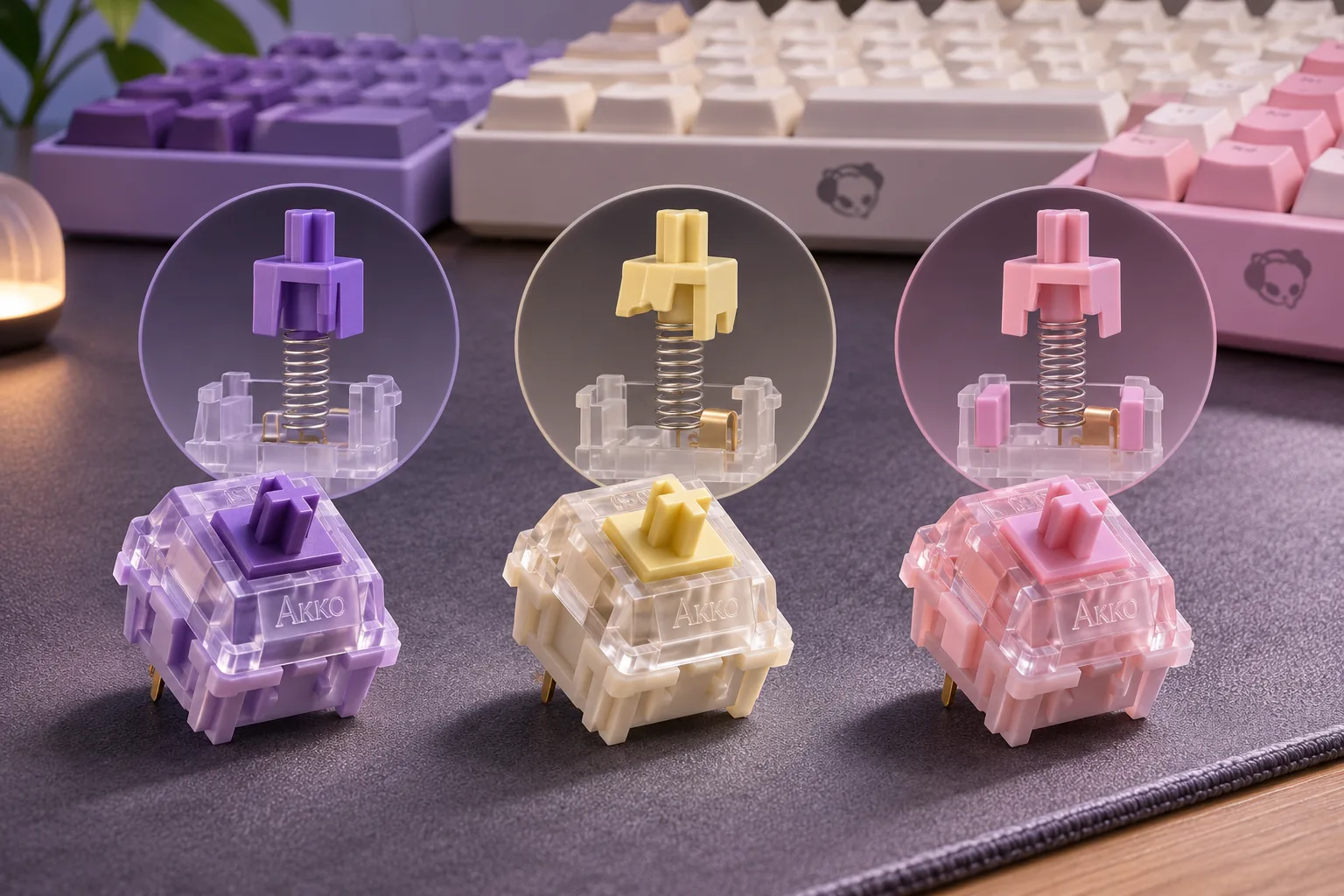
Quick answer: For a straightforward comparison, Akko labels V3 Creamy Yellow Pro as linear and V3 Creamy Purple Pro as tactile. Its Fairy is linear silent; Penguin is tactile silent. The two V3 examples are both listed as 5-pin, but that alone does not prove they fit every Akko keyboard—or every hot-swap board. S01 · S02 · S03 · S04
Contents
- Linear, tactile, and silent switches
- Representative Akko switches compared
- Check compatibility before buying
- How to choose Akko key switches
- Where to check U.S. availability
- Frequently asked questions
- Final choice: Akko key switches
Linear, tactile, and silent switches
Linear describes a press with no tactile bump called out in the switch specification. Akko’s V3 Creamy Yellow Pro page labels it linear, lists 50gf ±10gf operating force, and gives 3.3mm total travel. That makes it a useful documented example for shoppers who want to compare a linear switch by its published force and travel figures. Those figures describe the manufacturer’s switch specification; they are not a measurement of your keyboard or a review of how it sounds. S02
Tactile switches add a feedback point during the press. Akko labels V3 Creamy Purple Pro tactile and lists 30gf ±5gf operating force, 3.0mm total travel, and 55gf ±5gf tactile force. Do not compare the 55gf tactile force directly with another model’s operating force: they refer to different points in a keypress. Use them as manufacturer figures for narrowing options, then consider a switch tester if you want to judge feel before buying a full pack. S03
Silent refers to a design intended to damp noise at the switch. It can still feel linear or tactile. Akko describes Fairy as linear silent and Penguin as tactile silent, so first decide which press feel you want, then decide whether to prioritize a quieter switch design. “Silent” is a product category, not a promise that the entire keyboard will make no sound; Akko’s pages provide no independent sound measurements for these examples. S04
Representative Akko switches compared
| Example | Akko’s category | Published specifications that help compare | Useful starting point |
|---|---|---|---|
| V3 Creamy Yellow Pro | Linear | 50gf ±10gf operating force; 3.3mm total travel; 5-pin | Compare if you want Akko’s documented linear example. |
| V3 Creamy Purple Pro | Tactile | 30gf ±5gf operating force; 3.0mm total travel; 55gf ±5gf tactile force; 5-pin | Compare if you want a tactile example with a shorter listed travel. |
| Fairy Switch | Linear silent | Akko identifies it as linear and silent, with 5-pin MX-structure fit | Consider if you want a linear feel and a switch designed to damp noise. |
| Penguin Switch | Tactile silent | Akko identifies it as tactile and silent, with 5-pin MX-structure fit | Consider if you want tactile feedback and a switch designed to damp noise. |
Specifications in the first two rows come from Akko’s product pages; the Fairy and Penguin classifications come from Akko’s silent-switch guide. The comparison is about documented type and construction. It does not rank typing sound, smoothness, gaming performance, or overall quality. S02 · S03 · S04
Check compatibility before buying
Hot-swappable identifies a keyboard designed for switch replacement. It does not mean every switch will fit. Before ordering, check these four items against your exact keyboard model and its manual:
- Switch technology: Akko’s switch catalog includes conventional mechanical and magnetic products. A magnetic switch is not automatically a replacement for a conventional mechanical one; match the technology the keyboard specifies. S01
- Socket and pin count: The example V3 Creamy Yellow Pro and Creamy Purple Pro pages specify 5-pin switches. Confirm whether your keyboard’s socket accepts 5-pin parts and whether its maker lists the exact switch family as compatible. A hot-swap label by itself does not answer that question. S02 · S03
- Stem and keycap fit: Akko identifies those examples as fitting keycaps with standard MX structure. If your keyboard uses a different switch or stem standard, verify the fit instead of relying on the Akko brand name alone. S02 · S03
- Pack quantity and variant: Product pages can offer multiple pack sizes or options. Confirm the selected quantity, exact switch name, and current checkout state before paying. Do not assume similarly named CS, V3, V5, silent, and magnetic products share specifications.
This check is useful even when the keyboard and switch are both made by Akko. Product families change, and Akko’s own catalog lists magnetic models alongside conventional switches. For a related customization decision, see our Akko keycaps guide, which covers keycap profiles and keyboard-layout fit.
How to choose Akko key switches
- Start with linear if you want an even keypress without a tactile bump. Compare operating-force and travel figures between exact models rather than selecting by color or a “creamy” name.
- Start with tactile if you want feedback during the press. Compare operating force, tactile force, and travel as separate values; they are not interchangeable measurements.
- Choose a silent-design switch if lowering switch noise is a priority in a shared room or office. Pick linear or tactile according to the feel you want, and treat the quiet label as the manufacturer’s design description—not an acoustic guarantee.
- Use a tester when feel is the deciding factor. Product specifications can narrow the search, but the numbers do not reproduce your own keyboard, keycaps, typing style, or desk surface.
There is no one Akko switch that is best for every board or typist. A model’s exact socket compatibility comes first; your preferred press feel comes next; noise reduction is another choice to weigh. If your keyboard has a hot-swap socket and its documentation confirms the switch type, then compare switch-specific force and travel information.
Where to check U.S. availability
Akko’s official site has a U.S. stock section, and the switch collection has shown a mix of available and sold-out products. Those catalog labels can change and do not establish the status of a particular pack at checkout. Open the exact product page, select its switch and quantity, and confirm that the order can ship to your U.S. address. S01 · S05
As an Amazon Associate I earn from qualifying purchases. Search Akko switches on Amazon. This search link is a shopping aid, not evidence that a specific switch, seller, or quantity is available.
Frequently asked questions
Are Akko switches linear or tactile?
Akko sells both. Its V3 Creamy Yellow Pro is listed as linear, while V3 Creamy Purple Pro is listed as tactile. Check the full switch name and current product specification because Akko’s catalog includes many generations and families. S01 · S02 · S03
Are Akko silent switches linear?
Some are, but not all. Akko describes Fairy as linear silent and Penguin as tactile silent. Choose based on both dimensions: the movement feel you prefer and whether you want the switch to include noise-damping design. S04
Will Akko switches fit any Akko keyboard?
Do not assume that. Akko sells both conventional mechanical and magnetic switch families, and keyboard sockets differ. Check the exact keyboard manual for switch technology and pin compatibility before buying replacement switches. S01
Does “hot-swappable” mean I can install any switch?
No. It means the keyboard supports switch replacement without desoldering, but the socket still limits what fits. Confirm the exact switch type and pin arrangement with the keyboard maker before ordering.
Final choice: Akko key switches
For Akko key switches, first confirm that the exact mechanical or magnetic technology and pin arrangement match your keyboard S01 · S02 · S03. Then choose linear or tactile feel, and decide whether a silent design matters to you S02 · S03 · S04. Use published specifications to narrow options; sample the switch if its feel is the deciding factor.
Sources checked November 7, 2026